Cloud technology has transformed the way businesses store data, run applications, and manage IT infrastructure. One of the core technologies behind this transformation is virtualization. It allows organizations to use computing resources more efficiently while improving flexibility, scalability, and cost management.
Virtualization in Cloud Computing creates a virtual version of physical computing resources such as servers, storage devices, operating systems, and networks. Instead of dedicating one physical machine to a single workload, virtualization enables multiple virtual environments to operate on the same physical infrastructure.
Understanding how this technology works is important for students, IT professionals, network engineers, and businesses planning to adopt cloud-based solutions. This guide explains its working process, major types, benefits, challenges, and practical applications.
What Is Virtualization in Cloud Computing?
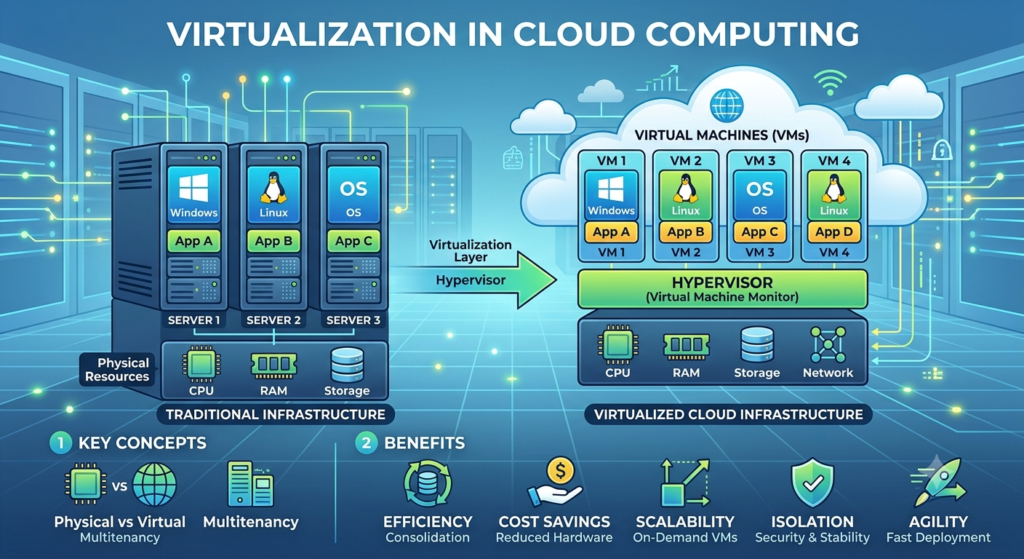
Virtualization is a technology that separates physical hardware resources from the virtual environments that use them. A specialized software layer called a hypervisor manages the physical hardware and creates multiple virtual machines (VMs).
Each virtual machine can have its own operating system, applications, memory allocation, storage, and virtual networking resources. Virtualization in Cloud Computing enables these virtual environments to share the same physical hardware while operating independently.
For example, a powerful physical server can be divided into several virtual machines. One VM may run a web application, another may host a database, and another may be used for development. This approach reduces hardware dependency and improves resource utilization.
How Does Virtualization in Cloud Computing Work?
The working process involves several important components. At the center is the physical infrastructure, which includes processors, memory, storage, and networking equipment.
The hypervisor is installed either directly on the physical server or on top of an operating system. It allocates hardware resources to individual virtual machines according to predefined requirements.
When a user requests a cloud service, the cloud platform identifies the resources required and assigns them from the available virtual infrastructure. The VM receives virtual CPU, RAM, storage, and network resources without requiring a separate physical server.
The hypervisor continuously manages these resources. Virtualization in Cloud Computing enables it to increase or decrease allocations depending on workload requirements. This makes the infrastructure more flexible and helps prevent physical resources from remaining unused.
Role of the Hypervisor
The hypervisor is one of the most important components of Virtualization in Cloud Computing. It acts as an intermediary between physical hardware and virtual machines.
There are two primary types of hypervisors:
Type 1 Hypervisor
A Type 1 hypervisor, also called a bare-metal hypervisor, runs directly on physical hardware. It does not require a traditional host operating system underneath it.
This architecture generally provides strong performance, efficiency, and security. It is commonly used in enterprise data centers and large cloud environments.
Type 2 Hypervisor
A Type 2 hypervisor runs on top of a conventional operating system. It is commonly used for testing, development, training, and desktop virtualization.
Although it may introduce an additional software layer, it is relatively easy to install and manage for individual users.
Types of Virtualization
Virtualization in Cloud Computing can be implemented in several forms depending on the resources being virtualized.
1. Server Virtualization
Server virtualization divides a physical server into multiple virtual servers. Each virtual server can operate independently with its own operating system and applications.
This approach improves server utilization and reduces the need to maintain multiple physical machines.
2. Storage Virtualization
Storage virtualization combines storage resources from multiple physical devices into a unified virtual storage system. Administrators can manage storage centrally without focusing on individual physical devices.
3. Network Virtualization
Network virtualization separates network services from the underlying physical infrastructure. It can create virtual switches, routers, firewalls, and other network components.
Technologies such as virtual LANs, software-defined networking, and virtual network functions support flexible network environments.
4. Desktop Virtualization
Desktop virtualization hosts desktop environments on centralized infrastructure. Users can access their virtual desktops from different devices while applications and data remain managed centrally.
5. Application Virtualization
Application virtualization allows applications to operate independently from the underlying operating system environment. It can simplify application deployment, management, and accessibility.
Benefits of Virtualization in Cloud Computing
Virtualization provides several advantages for organizations adopting cloud infrastructure.
Better Resource Utilization
Traditional physical servers may operate below their maximum capacity. Virtualization allows several workloads to share the same hardware, helping organizations use available processing power and memory more effectively.
Reduced Infrastructure Costs
Because multiple virtual environments can run on fewer physical servers, businesses can potentially reduce hardware purchases, electricity consumption, cooling requirements, and data center space.
Improved Scalability
Cloud workloads can change rapidly. Virtualized resources can be provisioned, modified, or removed more easily than physical infrastructure. This makes it easier for organizations to respond to changing business requirements.
Greater Flexibility
Virtual machines can be created from templates and moved between compatible infrastructure. This simplifies deployment and allows IT teams to respond more quickly to operational requirements.
Isolation
Virtual machines operate in separate environments. If one VM experiences a software issue, other VMs can remain operational, depending on the infrastructure and configuration.
Disaster Recovery
Virtualization can simplify backup, replication, and recovery processes. Organizations can maintain virtual machine images or replicas and restore workloads more efficiently following infrastructure failures.
Virtualization vs. Traditional Physical Infrastructure
In a traditional infrastructure model, applications often run directly on dedicated physical servers. If an organization needs another workload, it may need to purchase and configure additional hardware.
Virtualized infrastructure takes a different approach. A single physical server can host multiple virtual machines, with resources distributed according to workload requirements.
This model offers greater flexibility and can simplify infrastructure management. However, virtualization also introduces additional management layers, making proper configuration and monitoring essential.
Real-World Applications
The practical applications of Virtualization in Cloud Computing are extensive.
Cloud service providers use virtualization to deliver infrastructure services to customers without assigning a dedicated physical server to every user. Organizations also use virtual machines for software development, testing, web hosting, database management, remote desktops, and disaster recovery.
For example, a development team can create separate virtual environments for testing different operating systems or application versions. Once testing is complete, these environments can be removed without affecting production systems.
Virtualization is also valuable for network engineers. Virtual routers, firewalls, and other network functions can be deployed as software-based components, supporting modern cloud networking and software-defined infrastructure.
Challenges of Virtualization
Although virtualization offers significant advantages, it also has certain challenges.
Performance overhead can occur because virtual machines share physical resources. Poorly configured environments may experience CPU, memory, storage, or network contention.
Security is another consideration. A vulnerability in the virtualization layer could potentially affect multiple virtual environments, so hypervisors and management platforms must be properly secured.
Management complexity can also increase as organizations operate large numbers of virtual machines. Monitoring, patching, resource allocation, backup, and lifecycle management require appropriate tools and processes.
Additionally, organizations need skilled professionals who understand virtualization, networking, cloud platforms, and security.
Virtualization and Cloud Computing: What Is the Connection?
Cloud computing depends on flexible access to computing resources, while virtualization provides an efficient way to abstract those resources from physical hardware.
Therefore, virtualization is not identical to cloud computing. Virtualization is a technology, whereas cloud computing is a broader service-delivery model. Cloud platforms can use virtualization to dynamically allocate infrastructure and provide scalable services to customers.
Professionals learning cloud infrastructure should understand both concepts because they frequently work together in modern data centers.
For learners interested in networking and cloud technologies, PM Networking provides educational resources covering networking, cloud computing, cyber security, and related IT technologies.
Future of Virtualization
The role of virtualization continues to evolve alongside cloud computing, automation, containers, edge computing, and software-defined infrastructure.
Modern organizations increasingly combine virtual machines with containerized workloads to create flexible application environments. Automation tools can also simplify provisioning, monitoring, and resource management.
As businesses continue adopting hybrid and multi-cloud architectures, virtualization is expected to remain an important part of infrastructure management. Professionals with knowledge of virtualization, cloud platforms, networking, and automation can therefore build valuable technical skills.
For students and IT professionals, developing practical knowledge is particularly important. PM Networking can help learners explore networking and cloud-related concepts as part of their broader technical education.
Conclusion
Virtualization has become a fundamental technology for modern IT infrastructure. By creating virtual environments on shared physical resources, it enables organizations to improve utilization, flexibility, scalability, and operational efficiency.
From server and storage virtualization to network and desktop environments, the technology supports many different use cases. Although organizations must address challenges involving performance, security, and management, the benefits make virtualization an essential component of many cloud infrastructures.
As cloud adoption continues to grow, understanding Virtualization in Cloud Computing can help aspiring IT professionals develop a stronger foundation in modern infrastructure technologies.
Frequently Asked Questions
1. What is Virtualization in Cloud Computing?
Virtualization is a technology that creates virtual versions of physical resources such as servers, storage, networks, and operating systems. It allows multiple virtual environments to share the resources of physical hardware.
2. What is a hypervisor?
A hypervisor is software or firmware that creates and manages virtual machines. It allocates physical resources such as CPU, memory, storage, and networking to different virtual environments.
3. What are the main types of virtualization?
The main types include server virtualization, storage virtualization, network virtualization, desktop virtualization, and application virtualization. Each type focuses on abstracting a different IT resource.
4. What are the benefits of virtualization?
Key benefits include better hardware utilization, reduced infrastructure costs, improved scalability, greater flexibility, workload isolation, simplified management, and support for disaster recovery.
5. Is virtualization the same as cloud computing?
No. Virtualization is a technology used to abstract physical resources and create virtual environments, while cloud computing is a broader model for delivering computing resources and services over a network. Virtualization can be an important technology within cloud infrastructure.