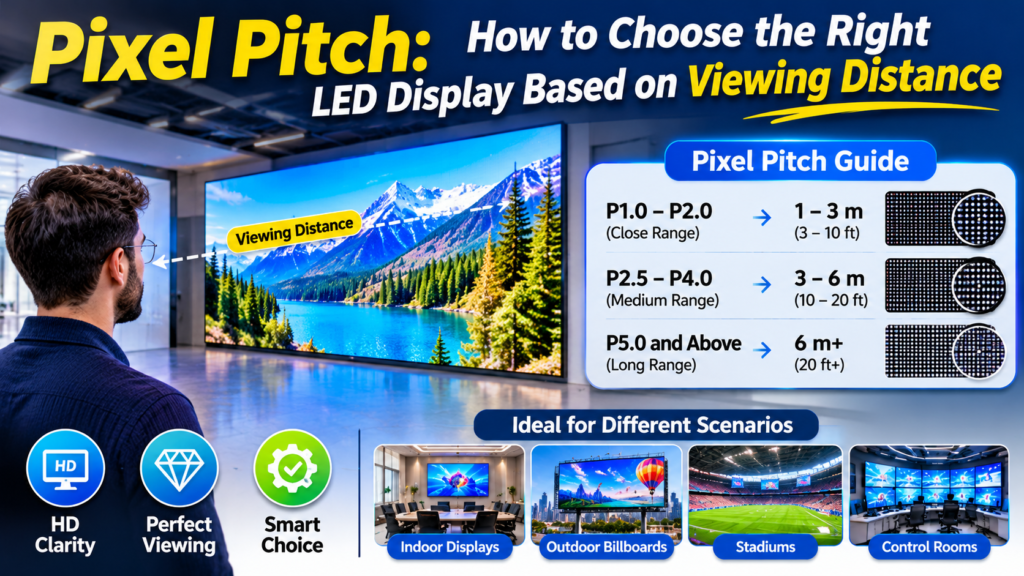
pixel pitch comparison showing LED display resolution and viewing distance
Have you ever ordered an LED screen that looked sharp in the showroom but appeared blurry when installed at your event? Or perhaps you paid extra for a high-resolution display when your audience couldn’t even notice the difference.
This usually happens when buyers overlook pixel pitch. It’s one of the first specifications you should check before purchasing an LED display because it affects image clarity, viewing distance, resolution, and overall project cost.
The good news? You don’t need to be an LED engineer to understand it. This guide explains how it works, provides a practical viewing distance chart, and shows how to select the right option for your project.
Table of Contents
- What Is Pixel Pitch in an LED Display?
- How Does Pixel Pitch Affect Viewing Distance?
- Complete LED Pixel Pitch Viewing Distance Chart
- How to Calculate the Right Pixel Pitch
- Which Pixel Pitch Is Best for Different Applications?
- What Other Factors Should You Consider?
- Common Buying Mistakes to Avoid
- Frequently Asked Questions
What Is Pixel Pitch in an LED Display?
Pixel pitch is the distance between the centers of two neighboring LED pixels, measured in millimeters. It determines how closely the pixels sit together on a display, which directly affects image detail and resolution.
For example, a P2 LED screen has a 2mm distance between adjacent pixel centers, while a P4 screen has a 4mm distance.
Here’s the simple rule: a smaller number means pixels sit closer together, creating a denser display with more detail.
How Does Pixel Spacing Work?
Imagine two LED screens with exactly the same physical dimensions.
- Screen A uses P1.5 LED technology.
- Screen B uses P3 LED technology.
Screen A has more pixels packed into the same area. As a result, it can show finer details and smaller text more clearly when viewers stand close.
Screen B has fewer pixels across the same area. It may still look excellent from farther away, but individual pixels become easier to notice at shorter distances.
Why Does Pixel Pitch Matter?
Choosing the right specification helps you balance image quality and spending.
A finer pitch usually costs more because the display needs more densely arranged LED components. However, choosing the finest available option isn’t always necessary.
For example, a large outdoor stage screen viewed from 50 feet away doesn’t need the same pixel density as a presentation screen viewed from six feet.
That’s why the intended viewing distance should guide your selection.
How Does Pixel Pitch Affect Viewing Distance?
The relationship is straightforward: smaller pixel spacing generally supports closer viewing, while larger spacing works better when audiences stand farther away.
When viewers stand too close to a display with a large pitch, individual pixels may become noticeable. This can make text and images look less smooth.
But when the display has a suitably fine pitch, the pixels blend together more naturally from nearby positions.
Minimum vs. Recommended Viewing Distance
There are two useful measurements to understand.
Minimum viewing distance is the approximate distance at which individual pixels become less noticeable to viewers.
Recommended viewing distance is a more comfortable distance where the display can look smooth and detailed for its intended content.
These distances are estimates, not fixed industry standards. Human eyesight, screen brightness, content type, and display calibration can change the actual viewing experience.
What Happens When You Choose the Wrong Pitch?
Choosing a pitch that’s too large can create visible pixel patterns during close viewing.
On the other hand, choosing an unnecessarily small pitch can increase the purchase cost without giving viewers a meaningful improvement.
For USA event organizers, this matters when planning exhibitions, concerts, conferences, and rental installations. A display that looks excellent from the back of a large venue may not deliver the same experience for someone standing near the stage.
Complete LED Pixel Pitch Viewing Distance Chart
The following chart provides practical estimates for common LED display pitches. It uses two simple guidelines:
- Minimum estimated viewing distance = pixel pitch × 2 meters.
- Recommended viewing distance = pixel pitch × 3 meters.
For example, a P2 screen has an estimated minimum distance of 4 meters and a recommended distance of 6 meters.
| LED Pixel Pitch | Minimum Distance | Recommended Distance |
|---|---|---|
| P0.9 | 1.8 m / 5.9 ft | 2.7 m / 8.9 ft |
| P1.2 | 2.4 m / 7.9 ft | 3.6 m / 11.8 ft |
| P1.5 | 3 m / 9.8 ft | 4.5 m / 14.8 ft |
| P1.8 | 3.6 m / 11.8 ft | 5.4 m / 17.7 ft |
| P1.953 | 3.9 m / 12.8 ft | 5.9 m / 19.2 ft |
| P2 | 4 m / 13.1 ft | 6 m / 19.7 ft |
| P2.5 | 5 m / 16.4 ft | 7.5 m / 24.6 ft |
| P2.604 | 5.2 m / 17.1 ft | 7.8 m / 25.6 ft |
| P2.976 | 6 m / 19.5 ft | 8.9 m / 29.3 ft |
| P3 | 6 m / 19.7 ft | 9 m / 29.5 ft |
| P3.91 | 7.8 m / 25.6 ft | 11.7 m / 38.4 ft |
| P4 | 8 m / 26.2 ft | 12 m / 39.4 ft |
| P4.81 | 9.6 m / 31.5 ft | 14.4 m / 47.2 ft |
| P5 | 10 m / 32.8 ft | 15 m / 49.2 ft |
| P6 | 12 m / 39.4 ft | 18 m / 59.1 ft |
| P8 | 16 m / 52.5 ft | 24 m / 78.7 ft |
| P10 | 20 m / 65.6 ft | 30 m / 98.4 ft |
Note: These are general planning estimates, not guaranteed viewing limits. Actual results depend on visual acuity, content, screen resolution, and installation conditions.
How Should You Read This Chart?
Let’s look at three practical examples.
Example 1: Conference Room
Suppose your audience sits approximately 10 feet away from the screen. A finer pitch, such as P1.2 or P1.5, may be worth considering, depending on the screen size and content.
Example 2: Indoor Exhibition
An exhibition screen viewed from around 20 feet may work well with P2.604 or P2.976, depending on the visual detail required.
Example 3: Outdoor Concert
A large stage display viewed from 40–50 feet may use P3.91 or P4.81, depending on the venue and content.
The best choice isn’t always the smallest number. Match the screen to the audience.
How to Calculate the Right Pixel Pitch
You can estimate the required pitch using a simple viewing distance calculation. This gives you a starting point before requesting a detailed recommendation from an LED manufacturer.
Use the Basic Calculation Formula
For a quick estimate:
Estimated minimum viewing distance (meters) = Pixel pitch (mm) × 2
To estimate a more comfortable viewing distance:
Recommended viewing distance (meters) = Pixel pitch (mm) × 3
For example, if you’re considering a P2.5 screen:
- Minimum distance: 2.5 × 2 = 5 meters.
- Recommended distance: 2.5 × 3 = 7.5 meters.
These calculations help narrow down your options, but they shouldn’t replace an actual viewing assessment.
How Does an LED Pixel Pitch Calculator Help?
An led pixel pitch calculator can make the selection process easier by helping buyers estimate suitable screen specifications based on viewing distance.
For a more useful project calculation, consider these details:
- Enter the expected audience viewing distance.
- Choose meters or feet as your measurement unit.
- Review the estimated pitch range.
- Compare available LED display models.
- Check whether the selected resolution suits your content.
Remember that viewing distance alone doesn’t determine the final screen specification. Screen dimensions, camera requirements, and the type of content also matter.
Calculate Screen Resolution From Pixel Pitch
You can also estimate the number of pixels across a display.
Horizontal resolution = Screen width in millimeters ÷ Pixel pitch
For example, consider a 4-meter-wide screen using P2.5:
- Screen width: 4,000mm.
- Pixel pitch: 2.5mm.
- Horizontal resolution: 4,000 ÷ 2.5 = 1,600 pixels.
This calculation helps you understand how screen size and pixel density work together.
Which Pixel Pitch Is Best for Different Applications?
Different installations need different display specifications. A conference room, concert stage, and outdoor advertising screen don’t share the same viewing conditions.
The best pixel pitch for monitor applications, professional video walls, and rental displays depends on how close people sit and what they need to see.
Computer Monitors and Close-Viewing Displays
When people sit directly in front of a screen, pixel density becomes especially important.
A best pixel pitch for monitor selection should account for viewing distance, display dimensions, resolution, and the type of content being shown.
For close-viewing LED video walls, fine pitches such as P0.9, P1.2, or P1.5 may be worth evaluating.
These options can suit:
- Control rooms.
- Professional monitoring environments.
- Corporate presentation spaces.
- High-detail visual displays.
However, standard desktop monitors use different display technologies and resolution standards. Don’t directly apply large-format LED wall calculations to an ordinary computer monitor.
Indoor Events and Exhibitions
Indoor event screens often serve audiences at different distances.
People sitting near the stage need clearer images than those standing at the back of the hall.
A led wall pixel pitch selection for exhibitions and conferences should consider:
- Audience seating arrangement.
- Stage-to-audience distance.
- Screen dimensions.
- Camera recording requirements.
- Text and graphic detail.
For example, MIC Display’s indoor rental LED range includes P1.953, P2.604, P2.976, and P3.91 options.
This gives event planners several configurations to compare according to their venue and content requirements.
Outdoor Concerts and Festivals
Outdoor displays often need to balance visibility, durability, and installation requirements.
Audiences usually stand farther away, so larger pixel pitches can be practical.
MIC Display’s outdoor rental range includes P2.604, P2.976, P3.91, and P4.81 options. Its listed outdoor stage rental configurations include brightness of at least 5,000 nits and IP65 protection.
These specifications can help event organizers compare options for concerts, festivals, and touring productions.
What Other Factors Should You Consider?
Viewing distance is a starting point, but several other specifications can affect your final decision.
Screen Size and Resolution
A larger display doesn’t automatically mean better image quality.
You should compare the physical screen dimensions with the available pixel resolution. This helps ensure that the display can show your intended content clearly.
Brightness and Viewing Environment
Indoor displays generally operate under controlled lighting, while outdoor screens face changing daylight conditions.
Make sure the selected model has suitable brightness for the installation environment.
Refresh Rate and Camera Performance
For events that involve professional photography, live streaming, or video recording, refresh rate matters.
A suitable high-refresh-rate configuration can help reduce visible flicker and improve camera performance.
Installation and Maintenance
Rental screens need to handle frequent transportation, assembly, dismantling, and storage.
Before purchasing, check:
- Cabinet weight and dimensions.
- Quick-lock connection design.
- Front or rear maintenance access.
- Spare module availability.
- Transportation requirements.
- Control system compatibility.
MIC Display offers rental configurations with lightweight cabinets, quick-lock structures, and flexible layouts for temporary event installations.
Common Buying Mistakes to Avoid
Even experienced buyers can choose an unsuitable display if they focus on one specification alone.
Avoid these common mistakes:
- Choosing the smallest pitch automatically: Fine pitch isn’t always necessary for distant audiences.
- Ignoring the nearest viewing position: People standing close to the stage may notice individual pixels.
- Forgetting screen dimensions: Pixel pitch and total resolution work together.
- Comparing indoor and outdoor products without checking specifications: Brightness and environmental protection requirements differ.
- Ignoring camera use: Events recorded for broadcast may need suitable refresh-rate performance.
- Overlooking maintenance costs: Rental equipment needs to support repeated installation and transportation.
Take time to compare the complete configuration before placing an order.
Frequently Asked Questions
What is a good pixel pitch for an LED display?
A good pitch depends on viewing distance, screen size, and content requirements. Fine pitches such as P1.2 or P1.5 suit close viewing, while P3.91 and P4.81 can be practical for larger event displays viewed from farther away.
Does a smaller pixel pitch mean better image quality?
Generally, yes. Smaller spacing allows more pixels within the same screen area, supporting greater image detail. However, the final experience also depends on resolution, calibration, content, and viewing conditions.
How do I calculate the viewing distance?
A simple starting point is to multiply the pitch in millimeters by two for an estimated minimum distance in meters. Multiplying by three provides another general estimate for a comfortable viewing distance.
What pixel pitch is best for a large LED video wall?
It depends on how far away the audience will stand. A conference video wall may need a finer pitch than a large concert display. Always consider the closest viewer, not just the average distance.
Is P2.5 better than P3.91?
P2.5 provides denser pixel spacing and can deliver more detail at closer distances. P3.91 may be more cost-effective for larger venues where viewers stand farther away. Neither option is universally better.
What pixel pitch is suitable for outdoor rental LED screens?
Common outdoor rental options include P2.604, P2.976, P3.91, and P4.81. The final choice depends on viewing distance, brightness requirements, weather protection, and event layout.
Does pixel pitch affect LED display cost?
Yes. Smaller pitches generally require more densely arranged LED components, which can increase manufacturing and purchasing costs. Compare the actual project requirements before paying for additional resolution.
Choosing the right display starts with understanding your audience and installation space. If you’re planning a concert, exhibition, or temporary event, explore MIC Display’s rental LED display options and discuss your viewing distance, screen size, and project requirements before selecting a configuration.