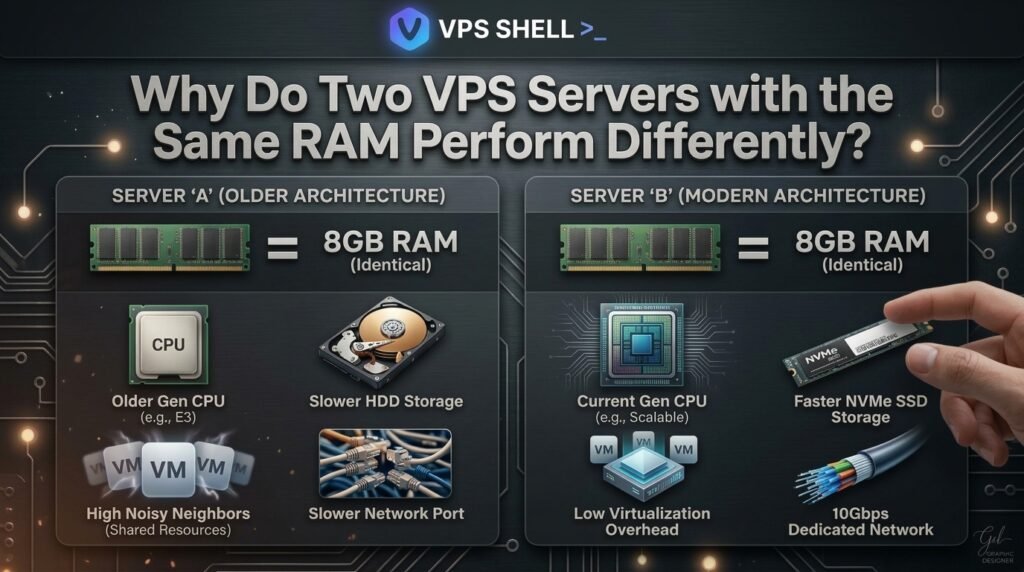
You buy two VPS servers plans, each with 8GB RAM. Their prices are similar, and both providers list the same storage capacity. You expect them to run at roughly the same speed.
Then you install your website on each server.
One loads pages quickly. The other takes longer to open a database, struggles with background tasks and slows down when several visitors arrive at once.
How can two servers with the same RAM behave so differently?
The reason is that RAM does not control every part of a server. Your VPS also depends on its processor, storage drive, network connection and the way the hosting provider manages its physical machines.
These details can make a real difference. If you are comparing VPS plans, here is what to check before choosing one.
The Same RAM Does Not Mean the Same Performance
RAM gives your server temporary working space. Your operating system, website software and databases use it while they run.
But spare memory cannot speed up a slow processor or make a poor network connection better.
Think about two people working at desks of the same size. One has a fast computer and can reach every tool they need. The other has an old computer and keeps waiting for files to open. They have the same desk space, but they will not finish their work at the same speed.
A VPS works in much the same way.
Two plans with 8GB RAM may differ in several ways:
- Processor model and speed.
- Number of CPU cores and how they are shared.
- Storage type and read/write speed.
- Network connection and data centre location.
- Virtualisation technology.
- Server software and settings.
- Number of other VPS customers using the same physical machine.
You need to look at these details together rather than judging a plan by its memory alone.
1. The CPU Handles the Work
The CPU processes the instructions sent by your websites and applications. When someone opens a page, the server may need to run PHP code, check a database and prepare the content for display.
A slow CPU can hold up these tasks, even if your VPS has plenty of unused RAM.
Why Two Plans with Four vCPU Cores May Differ
Both providers may advertise four vCPU cores, but the physical processors behind those plans may not be the same.
One may use a newer processor with stronger single-core performance. The other may rely on older hardware. The providers may also set different limits on how much CPU time each VPS can use.
This matters when you run:
- WordPress websites with several active plugins.
- Online shops that process orders.
- Applications that handle frequent requests.
- Scripts that perform large calculations.
- Databases with many simultaneous queries.
Check the processor details where possible. Also ask whether CPU resources are dedicated or shared. Four vCPU cores do not always mean you have the same processing power as another four-core VPS.
2. Storage Speed Can Change How Your VPS Feels
Your VPS reads and writes data throughout the day. It loads website files, opens databases, saves uploads and records server activity.
If the storage drive is slow, these jobs can take longer.
This is easy to notice on a website with a large database. For example, an online shop may need to fetch product details, prices and stock information whenever a customer opens a product page.
Here is how common storage types compare:
| Storage type | What to expect |
|---|---|
| HDD | Traditional mechanical storage; generally slower |
| SATA SSD | Faster storage with no moving parts |
| NVMe SSD | High-speed storage suited to demanding workloads |
NVMe is often a good choice for websites that make frequent database requests. However, two providers can both advertise NVMe storage and still deliver different results.
The drive model, storage system and read/write limits all matter. Check these details instead of relying on the word “NVMe” alone.
3. A Poor Network Can Slow Down a Fast Server
Your server may process requests quickly, but visitors still need to receive the results. That depends on the network connection between their devices and your VPS.
Three network details are worth checking:
- Latency: How long data takes to travel between the visitor and the server.
- Bandwidth: How much data the connection can carry.
- Packet loss: Data that fails to reach its destination and may need to be sent again.
High latency can make a website feel slow, even when the server itself has strong hardware.
Does the Data Centre Location Matter?
Yes. If most of your visitors are in the UK, a server closer to them may reduce the distance their requests travel. The network route and provider’s connection quality matter too.
For a business serving customers in Eastern Europe, comparing reliable Romania VPS Server hosting plans can help narrow down suitable locations. Check the data centre, network details and server resources before making a choice.
Do not assume that the nearest data centre will always be the fastest. A well-connected server slightly farther away may perform better than one with a poor network route.
4. Virtualisation Affects How Resources Are Managed
A VPS runs inside a virtual machine or container on a physical server. The provider uses virtualisation software to divide and manage the machine’s resources.
Different platforms handle this in different ways.
KVM and OpenVZ
Two names you may come across are KVM and OpenVZ.
- KVM: Creates virtual machines with their own virtual hardware and operating system environment.
- OpenVZ: Uses container-based virtualisation, where containers share the host’s operating system kernel.
KVM is often chosen by users who want a separate virtual machine environment and support for different operating systems.
Still, the technology alone does not decide which VPS is faster. A well-managed server on one platform can outperform a poorly managed server on another. The physical hardware and resource limits remain important.
5. Other Customers Can Affect Your VPS
Some hosting providers sell more virtual resources than their physical servers can comfortably handle. This is called overselling.
It does not mean every oversold VPS will run slowly all the time. The trouble can appear when many customers use their resources heavily at once.
You might notice that your website works well in the morning but slows down later in the day. CPU usage may rise, database tasks may take longer, or applications may become less responsive.
Before buying, ask the provider:
- Are CPU resources shared or dedicated?
- Are there limits on disk input/output?
- How does the provider manage busy physical servers?
- Does the plan have clear fair-use rules?
A low monthly price is not much help if the server struggles whenever your website gets busy.
6. Server Settings Can Make a Noticeable Difference
Even two VPS plans with similar hardware can perform differently because of their software setup.
One server may have a well-configured web server and database. The other may be running unnecessary services or using settings that do not suit the website.
For a WordPress site, performance can depend on:
- The PHP version.
- Apache or Nginx settings.
- PHP-FPM configuration.
- Database settings.
- Page and object caching.
- Unused plugins and background tasks.
You do not need to install every performance tool available. Too many plugins and services can use more memory and CPU without making the website faster.
Start with the basics. Keep your software updated, remove tools you no longer use and check whether caching is set up correctly.
7. How to Compare Two VPS Servers Fairly
Provider specifications are useful, but they cannot tell you everything. If you have access to both servers, run the same tests on each one.
Test the CPU
Use the same CPU benchmark on both VPS plans. Compare single-core and multi-core results.
Single-core performance matters for tasks that rely on one core. Multi-core performance matters when software can handle several tasks at once.
Check Disk Speed
Run a storage test to measure read and write speeds. Include random operations, as these can give you a better idea of how storage handles database activity.
Measure Network Latency
Test the connection from the places where your visitors live. Check latency and packet loss, not just download speed.
Test Your Actual Website
A benchmark score is only part of the story. Put the same website on each VPS and compare:
- Page response time.
- Time to First Byte (TTFB).
- CPU and RAM usage.
- Database response time.
- Performance during busy periods.
Try to keep the website files, plugins and settings the same. Otherwise, you may end up comparing two different setups rather than the servers themselves.
8. What to Check Before Paying for a VPS
Before placing an order, go through this list:
-
Check the CPU model and vCPU allocation.
-
Ask whether CPU resources are shared or dedicated.
-
Confirm the storage type and any disk speed limits.
-
Check the data centre location.
-
Review network details and latency options.
-
Find out which virtualisation platform is used.
-
Read the backup and restore terms.
- Check the provider’s support hours.
- Look at upgrade options and renewal prices.
If a provider does not publish important details, ask its support team. A clear answer can tell you a lot about how it handles customer questions.
Conclusion: Look Beyond the RAM Figure
Two VPS servers can have the same 8GB RAM and still deliver very different results. The processor, storage, network, virtualisation platform and server settings all play a part.
Before choosing a plan, think about the work your server will handle. A small blog has different needs from an online shop or a busy business application. Match the hardware to your workload rather than paying for figures that look impressive.
If your audience is based in Eastern Europe, compare high-performance VPS Hosting Ukraine plans and check the CPU, NVMe storage, network quality and support on offer.
A few careful checks can help you choose a VPS that runs well in practice, not just one that looks good in a pricing table.
Frequently Asked Questions
1. Can two VPS servers with 8GB RAM have different speeds?
Yes. They may use different processors, storage drives, networks and virtualisation platforms. These differences can affect how quickly websites and applications run.
2. Is CPU more important than RAM in a VPS?
It depends on the workload. RAM gives applications room to run, while the CPU processes their tasks. A website with heavy database activity may need a good balance of both.
3. Does NVMe storage make a VPS faster?
It can. NVMe drives offer fast data access and can help with database-heavy websites. However, a slow CPU or poor network can still affect the overall experience.
4. How can I tell if my VPS is underperforming?
Watch CPU usage, memory, disk activity and network latency. You can also test website response times at different hours to see whether performance drops during busy periods.
5. Does KVM guarantee better VPS performance?
No. KVM provides a separate virtual machine environment, but speed still depends on the physical hardware, resource allocation and server management.